Frequently Asked Questions - About How to Repair Corrupt or Damaged Powerpoint Files

Nucleus Data Recovery
Best Selling Data Recovery Software Fastest Data Recovery QFSCI Technology for fastest recovery of data Leaders in Data Recovery
 
Current Updates

Professional Powerpoint File Recovery Software for the recovery of damaged files. Kernel Powerpoint File Repair is a powerful tool to repair corrupt Powerpoint files. Recover Powerpoint Files, Powerpoint Data Recovery Software, Restore Powerpoint Files, Fix Powerpoint files, Recover Corrupt Powerpoint Files

Frequently Asked Questions

 I have tried the Evaluation version. How can I decide to purchase Full version of the software?

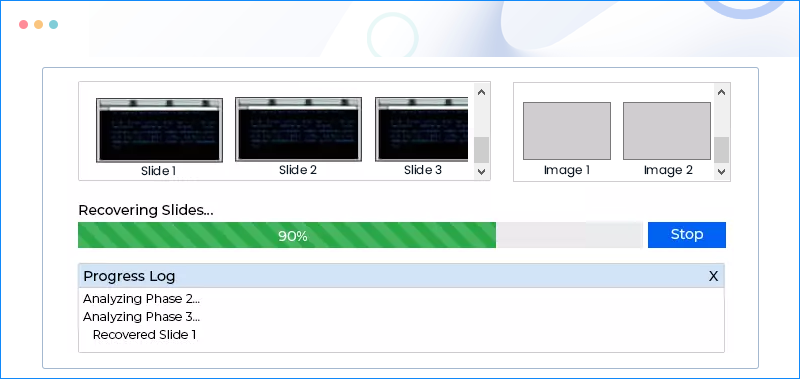
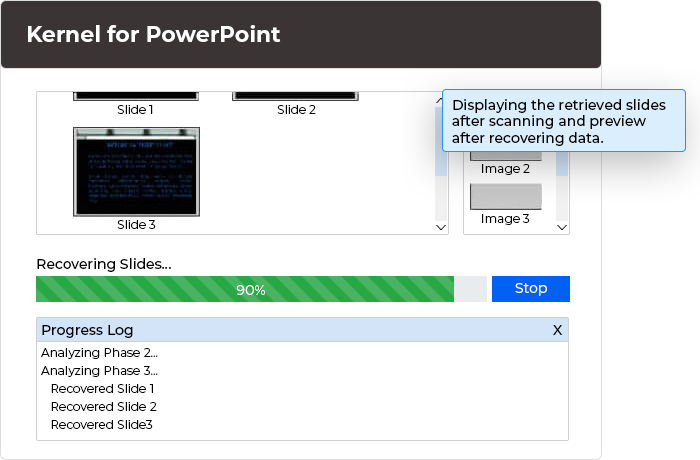
You can decide this through the results displayed by the Evaluation version. The Evaluation version shows you the preview of the slide contents which can be recovered. You can analyze the correctness of the recovered slides, images, sound effects, animation effects, basic shapes and every object which is created in the presentation files.

The demo version is fully functional and only restricts the saving process. After you have verified the results you can purchase Full version of the Kernel PowerPoint Recovery software to save the recovered file. So, just try the demo first.

 Can it recover deleted powerpoint files from my hard drive ?

No, Kernel Powerpoint is a File Repair Software, it can only repair corrupt files.
To recover your deleted powerpoint file
use Kernel for FAT + NTFS - Data Recovery Software

 How much time will it take to repair my corrupt powerpoint file?

Time for repairing the corrupt file depends on the size of the file and the intensity of corruption caused to the file.
In general if it takes around 1-3 minutes to scan and repair the corrupt file.

 I am getting an error message which says, “Not enough disk space”. What should do I do?

If your computer system is displaying the message of less disk space then first check the available space on your hard disk drives. This message is displayed only when there is less space to save the recovered data.

Your computer system should have enough free space (2-3 times of the original presentation size).

 Nucleus Kernel PowerPoint Recovery software gives Error when repairing files on Windows 98.
      What should I do?

The Nucleus Kernel PowerPoint Recovery software does not supports recovery of corrupt powerpoint files on Windows 98. To use the software install the software on PC having either Windows 2000, Windows XP, Windows 2003.

 When the corrupt PowerPoint presentation recovery process is going on, an “ActiveX component cannot create an object” error message appears. What is the solution to this problem?

The message is displayed if the installed powerpoint software is having some missing components. If the message ActiveX component cannot create an object is displayed then you should wait for a moment and the software will automatically handle the error and proceed futher.

 While using the Kernel PowerPoint recovery an Internal Program Error is displayed. What should I do?

These internal errors are created due to the corruptions which Kernel PowerPoint Recovery handles effectively. During the recovery process, if these kinds of errors occur, please be patient and let the software resolve the errors.

If still the problem persists you should contact our Support team. It would be helpful if you send us the screenshots and log error file accompanied with your email. To generate the error log file, perform the following:

  1. Start the software again and before starting the recovery process go to the Tools menu.
  2. Select Tools > Settings. The “Folder Settings” screen will be displayed.
  3.  Check the Generate Log checkbox.
  4. Now start the recovery process. When the software will display an error, a log error file will be created in the C drive of your computer system.
  5. Copy the file and send it to us, this would help us to solve your problems effectively.

 What is the difference between the Demo Version and Full Version of Kernel PowerPoint recovery software?

The Demo version of the Kernel PowerPoint recovery software displays the data which the software can recover. This preview will help you to analyze the accuracy and correctness of the data which you want to recover but restricts you from saving the recovered data. The demo version is fully featured and functional. Full version enables you to save the recovered presentation files.

 Kernel PowerPoint Recovery has two modes of recovery. What is the main difference between the two?

Kernel PowerPoint recovery software offers two modes to recover the presentation files: Standard Mode and Integrated Mode.

The Standard Mode is a powerful and advanced mode of recovery. This mode easily handles the major corruptions and can be used if the Integrated mode does not provide desired results. The slides recovered through this mode may have raw data which has to be organized again in the slides.

The Integrated Mode is simple, fast and quick method to recover the corrupt presentation files. This mode is best suited for the less corrupted presentation files.

 How long would I need to wait for the product after purchasing it ?

The delivery of the product is immediate. You will be taken to download page after you complete the purchasing process. The Activation Key and Password will be mailed to you with in next 15 minutes.

 Would I get an invoice for my purchase ?

Yes, we provide every customer with a soft copy of the invoice. This is send on the same day, on your email.

spacer


View Kernel Powerpoint File Recovery Software in Action


"Your Disk Crashed and now you are confused which software to use for recovering your precious data",

Relax, we can help you choose best data recovery software for recovering your data.


Filler

Windows Data Recovery | Linux Data Recovery | Novell Data Recovery | Mac Data Recovery | SQL Password Recovery | BKF File Recovery
Digital Media Recovery Software | Unix Data Recovery Software | RAID Server Data Recovery | Exchange Server Recovery
SQL Recovery | Hard Drive Data Recovery | Computer Forensic | Tape Recovery Software | Laptop Recovery | Netware Data Recovery
FAT + NTFS Partition Recovery | Data Recovery Services | NTFS Recovery | Novell NSS Data Recovery Software
Access Database Repair | Excel Repair Software | Powerpoint Repair | Word Repair Software | ZIP Repair
DBF Database Recovery | Palm Database Recovery | Paradox Database Recovery | FAT Recovery
File Repair | Partition Recovery | Excel Recovery | Corrupt Zip Recovery | Repair BKF File
Outlook Express Mails Recovery Software | Microsoft Outlook Mails Recovery Software
OST Recovery Software | Pen Drive Recovery | Undelete Data Recovery Software
ReiserFS Data Recovery Software | JFS Data Recovery Software | Related Links
Data Recovery | Data Recovery Software

Contact Us for Data Recovery »

We HELP you Recover your data from Corrupt Powerpoint Files - Professional Powerpoint File Recovery Software for the recovery of damaged files. Kernel Powerpoint File Repair is a powerful tool to repair corrupt powerpoint files. Fix Powerpoint files, Recover Corrupt Powerpoint Files and Presentations.

© Copyright 2008 Nucleus Data Recovery - Professional Data Recovery Software and Services.  All rights reserved.